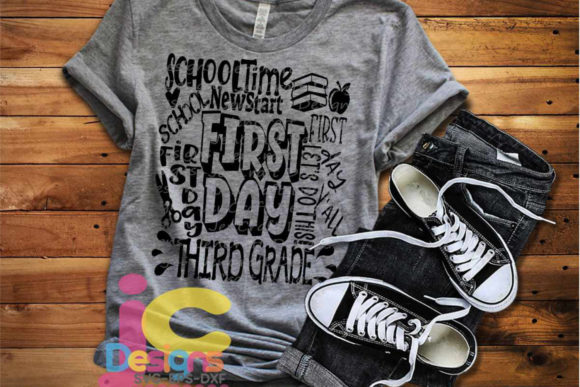
First Day of Third Grade: Creating Meaningful Keepsakes and Projects with Versatile Design Files
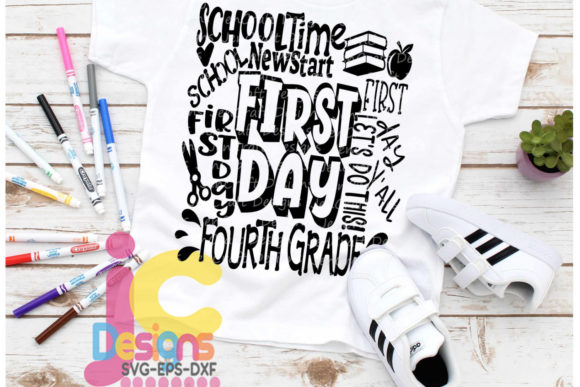
Back-to-school season is a milestone for families, educators, and creators alike. Among the many transitions that mark a child's academic journey, the first day of third grade holds a special place. It is a moment when students are no longer primary beginners but are becoming more independent learners, and the excitement of a new year is palpable. For parents, teachers, and small business owners who create personalized goods, this occasion is also an opportunity to produce memorable items that celebrate the moment. The First Day of Third Grade SVG typography design files offer a practical and flexible resource for anyone looking to craft custom projects that capture this milestone.
These design files, available in SVG, EPS, DXF, and PNG formats, are not just decorative elements. They are building blocks that fit into a broader creative or business workflow. Whether you are a parent making a custom shirt for your child's first day, a teacher preparing classroom decorations, or a small business owner fulfilling orders for back-to-school merchandise, understanding how to integrate these files smoothly can save time, reduce frustration, and produce professional results.
Understanding the Design Files and Their Role in Your Workflow
Before diving into project ideas, it helps to clarify what you are working with. The First Day of Third Grade collection includes high-quality digital cutting files designed for use with popular cutting machine software such as Cricut Design Space, Silhouette Studio (Basic and Designer editions), Sure Cuts A Lot, and Brother ScanNCut. The files are also compatible with Adobe Illustrator and CorelDraw, making them useful for graphic designers and print-on-demand sellers.
Each zipped folder contains:
- SVG digital cutting files
- EPS digital cutting files
- DXF digital cutting files
- PNG transparent clipart files at 300 DPI
The multicolor SVG and EPS designs are layered, meaning you can ungroup them for easy separation of colors and elements. This is especially useful when working with materials like iron-on vinyl, adhesive vinyl, or sublimation prints. Monogram frame designs do not include a monogram font unless stated, so plan accordingly if your project requires custom initials.
These are JenCraft exclusive original designs, which means you are getting clean, well-tested files that cut smoothly and maintain their integrity across different software environments. For anyone who has struggled with poorly constructed SVGs that misalign or produce jagged cuts, this reliability is a practical advantage.
Practical Ways to Use the First Day of Third Grade SVG Files
The versatility of these design files means they can be applied before, during, and after the back-to-school transition. Here are specific use cases based on real workflows.
Creating Custom Apparel for the First Day
One of the most common uses for back-to-school SVG files is making personalized shirts. A First Day of Third Grade design on a t-shirt or sweatshirt becomes a wearable memory that families often photograph and cherish. If you are using a cutting machine like a Cricut or Silhouette, the layered SVG format allows you to separate colors and assign them to different vinyl sheets. For example, you can cut the typography in one color and any decorative elements in another, then layer them using transfer tape.
For sublimation projects, the PNG file at 300 DPI works well. You can print the design onto sublimation paper and press it onto polyester garments or blanks. Because the background is transparent, the design integrates cleanly without white halos.
Small business owners can batch-produce these shirts for local customers or online shops. Since the files are original and high-quality, you avoid the legal and quality issues that come with using unlicensed or poorly made designs.
Decorating the Classroom or Home Learning Space
Teachers and homeschooling parents can use these designs to create wall decals, door signs, or bulletin board headers. The DXF and SVG formats import easily into Silhouette Studio and Cricut Design Space, where you can resize the design to fit a larger surface. Cutting adhesive vinyl for a classroom door or a chalkboard creates a welcoming environment that reinforces the excitement of the new grade level.
Home décor projects like framed wall art or wooden signs can be made using the EPS or SVG files with a laser cutter or a vinyl cutter. The layered design allows you to use different colors of vinyl or paint to match the classroom or home theme.
Producing Gifts and Keepsakes for Families
Grandparents, aunts, uncles, and family friends often look for meaningful gifts during back-to-school season. A custom mug, water bottle, or tote bag featuring the First Day of Third Grade design is a thoughtful present that marks the occasion. The PNG file can be used for sublimation on drinkware, while the SVG and EPS files are ideal for cutting heat-transfer vinyl for fabric items.
For a more permanent keepsake, consider creating a layered paper or wood ornament. The ungrouped layers make it easy to separate elements, cut them from different materials, and assemble them into a dimensional piece.
Technical Considerations for Smooth Integration
Getting the best results from these design files requires attention to a few technical details. The file formats are widely compatible, but each software environment has its own quirks. Here are observations based on common workflows.
Preparation Before Cutting
Before opening the files, unzip the folder and review the contents. Each file is labeled clearly, so you can select the format that matches your software. If you are using Cricut Design Space, the SVG format is the most straightforward. For Silhouette Studio Basic (free edition), DXF is the recommended format because the free version does not support SVG imports. The Designer edition handles SVG directly.
When you open a layered file, take a moment to ungroup the elements and check the color assignments. Some designs may have layers grouped by color, which makes it easy to assign each layer to a different cutting mat or material. If you need to resize the design, do so while maintaining the aspect ratio to avoid distortion.
Usability Across Different Materials
The same design can behave differently depending on the material. For adhesive vinyl used on walls or laptops, a standard cut setting works well. For iron-on vinyl on fabric, remember to mirror the design before cutting. The PNG file, being a raster image, does not need mirroring for sublimation but does need to be printed at the correct resolution to avoid pixelation. The 300 DPI resolution in the provided PNG is sufficient for most print sizes.
Organization and Long-Term Use
If you plan to use these files year after year, consider organizing them in a folder system by grade level and project type. Because the First Day of Third Grade design is part of a larger series, you might collect similar designs for other grades. Keeping the original zipped folders intact, along with a separate folder for unzipped and organized files, helps maintain consistency. For small businesses, this organizational approach saves time when reordering or updating product listings.
Quality control is another factor. Before cutting a final project, perform a test cut on scrap material. This confirms that the file is importing correctly, the layers are aligned, and the cut settings are appropriate. The clean lines of JenCraft designs generally produce reliable results, but material variables like vinyl thickness or blade sharpness can affect the outcome.
Integrating the Design Files into a Business or Creative Routine
For entrepreneurs and freelancers, efficiency matters. The ability to use one design across multiple product types—shirts, mugs, decals, signs, and sublimation prints—means you can maximize the value of a single file purchase. The First Day of Third Grade SVG is not a one-time asset. It can be used repeatedly for made-to-order items, seasonal sales, or bundled products.
If you run an Etsy shop or a local craft business, having a library of grade-specific designs allows you to quickly create listings as the school year approaches. You can pair the design with coordinating elements like stars, apples, or school bus graphics to expand your product line. The layered format makes it simple to swap out colors to match different school colors or customer preferences.
For educators and bloggers, these files can be used to create free printables or digital resources for other teachers. The PNG version works well for digital scrapbooking, classroom newsletters, or social media graphics announcing the first day of school. In this context, the design becomes part of a broader communication workflow rather than a physical product.
Observations on Compatibility and Workflow Efficiency
One of the strengths of this design collection is its multi-format nature. Not all cutting machine users have the same software, and not all projects require the same file type. By providing SVG, EPS, DXF, and PNG, the collection accommodates a wide range of users without requiring additional conversion steps. This reduces friction during the setup phase, which is often where frustration occurs.
For users working with Silhouette Studio Basic, the DXF format is the most reliable path. For those using Cricut Design Space, SVG is the native format and imports cleanly. EPS files are best suited for vector editing in Illustrator or CorelDraw, especially if you plan to modify colors or add text. The PNG file, with its transparent background, is the easiest option for quick digital use or print-on-demand services that accept raster images.
When moving between software, be aware that layer names and color groupings may not transfer identically. Opening the file in a vector editor first to verify the structure can prevent surprises later. This extra step is especially useful for complex multicolor designs where precision matters.
Making the Most of the First Day of Third Grade Moment
The first day of third grade is more than a date on the calendar. It represents a shift in a child's academic journey, and for the adults who support them, it is a chance to create something tangible that commemorates the milestone. Whether you are crafting for your own family, your classroom, or your customers, the right design file makes the process smoother and the result more polished.
By choosing original, high-quality files like those in the JenCraft collection, you invest in reliability. The time saved on troubleshooting poor file quality can be redirected into the creative parts of the project: choosing colors, selecting materials, and personalizing the final piece. For anyone who regularly produces custom goods, that efficiency adds up quickly.
As you plan your back-to-school projects, consider how these design files fit into your existing workflow. Preparation, organization, and attention to file format compatibility will ensure you get consistent, professional results. The First Day of Third Grade typography designs are not just decorative—they are a practical tool for capturing a meaningful moment and turning it into something lasting.